Saturday, 20 February 2016

How to BOOK Freedom 251 Smartphone


 Freedom 251 Smartphone by Ringing Bells

                                                                              Online Order @251


How to Book Freedom 251 Smartphone Online Order @ 251 RS

 Phone Specification


Display                 Processor             RAM              Resolution                  Storage
4.00-inch              1.3GHz                   1GB               540x960 pixels               8 GB

Front Camera             Rear Camera                        OS                     Battery capacity
    0.3-mp                         3.2-mp                          Android 5.1                 1450mAh

Charges

Phone + Delivery charges = Rs 251  +Rs 40 = Rs 291


Steps to Register


Step1 : Goto www.freedom251.com 

Step2: Click on BuyNow

Step3: Add your Shipping address.
          Details Required
          Email address                     Mobile Number
           
          Click on register

Step4: After 48 hrs  you will recieve a mail for billing.Pay the Bill and wait till it delivered to you.


ENJOY


Thursday, 18 February 2016


BYPASSING THE SRM (SECURITY REFERENCE MONITOR) – WINDOWS LOGIN PASSWORD


windows_seven_glow_1920_1080

Heya again, this is a back to back post on BHS under the category Windows hacking as since I have written an article a very long time back, I today decided to give away a couple of articles together. This is my second article of this day, hope of you are enjoying!
This tutorial is about bypassing the SRM that is your Windows Login Password to gain the complete access into the victim’s computer.
Before getting started with this you gotta read my previous articles on Windows Security Architecture and Breaking LSA: The BIOS Password.
So coming to the topic, Windows login password I must tell you that there are three concepts to break this. They are Cracking, Hacking and Bypassing.
You must be familiar with these terms or else you can request me a brief article with scenarios and examples about this!
The concept I am discussing right now is bypassing. Well, this is the simplest way and all you need is a bootable USB or a Disk with a software called KonBoot. This software is around 110kb in size and does a very surprising work.
You can download the iso image of this software online, google it!
If you can’t get a free version there then I can provide you one, just drop me an e-mail.
Now take a USB drive or a Disk and make it bootable using a software called U-netboot. This is available online for free.
After you make your USB drive bootable you are done with requirements stuff. That is you are ready with your setup to hack the Windows login password of the victim.
 So now you just need to follow the simple steps below to bypass the login screen:
  1. Suppose, you are at login screen, so restart the victim’s computer and enter into the BIOS of the system. Change the boot priority to USB drive.
  2. Now exit from the BIOS and restart the system again.
  3. Now before you see something on the screen in just insert the bootable USB drive.
  4. The system will boot through the USB and automatically restarts!
  5. Immediately remove the USB drive from the slot before you see something on the screen.
So now your Windows starts up and did you notice that? It didn’t ask you for the password!!!
You are done… ;)
Below here is a video demonstration I have embedded which was available on YouTube. Hope this information would be helpful to you…!

Thursday, 16 April 2015

Flipkart Unlimited Money/E-Gift Voucher Trick

Flipkart Unlimited Money/E-Gift Voucher Trick


Hello friends, GREAT NEWS. This time we bought you a trick that will let you get unlimited Flipkart E-Gift Voucher or money. You might know that flipkart affiliate is paying for referring for its app installs(Rs 25 per install). The offer is only for April, so loot this offer with our trick before it ends. How to Get Unlimited Flipkart Gift Voucher

STEPS FOR UNLIMITED FREE GIFT VOCHERS:

1. Download Android ID Changer App fromhere.

https://play.google.com/store/apps/detai...didchanger

2. Install the app in rooted Bluestacks or in your android device.

3. Open android id changer app and generate new ID by clicking on the top right plus button. Now Save new ID


4. Install the Flipkart app fromhere and sign-up in it with a new e-mail.

5. Go to flipkart affiliate program here and register there with the same e-mail id you used to create new account on flipkart app.
http://www.flipkart.com/affiliate
6. Enter your details and set payment mode as bank or Gift voucher. Save your changes.

7. Go to landing page and scroll down a bit, you will see your app campaign referral link. Copy the link.


 8. After that uninstall flipkart app and again generate new android id with android id changer app.

9. Open opera mini and paste your app affiliate link, download flipkart app again. (Use only opera mini to install the app).

10. Register in flipkart with another new id.

Do steps 8 to 10 again and again and keep earning unlimited. After reaching your desired certain earning you can transfer the money earned to bank by NEFT or get E-Gift Voucher.


If your earnings isn't increasing do use any vpn software to change your location and try again. For me opera minidid the job.To Check your earnings go to reports>App Installs Reports.


NOTE: Wait Up to 24 hours to see your refferal credit in your account.
if today you did 10 affiliates by this process,tommorow you will see 250 rupees in your account deffinately

If you don't have bank a/c you can take a gift voucher or you will transer your money to your account 


<script type="text/javascript" language="javascript"> var aax_size='728x90'; var aax_pubname = 'bunse-21'; var aax_src='302'; </script><script type="text/javascript" language="javascript" src="http://c.amazon-adsystem.com/aax2/assoc.js"></script>

Tuesday, 6 January 2015

FREE UNLIMITED GPRS/3G IDEA


FREE UNLIMITED GPRS/3G IDEA


With this you can access internet for free

REQUIREMENTS :

1) Android phone

2) idea SIM card with Zero Balance

Method :


1) Download DroidVPN from Google play store

2) Activate zero rental GPRS /3G service
     
    To activate Zero rental GPRS
      
          Type ACTGPRS and SEND it to 12345(toll free)
    
    To activate Zero rental 3G
     
           Type ACT3G and SEND it to 12345(toll free)

3) Now create an account on DroidVPN and get your username          and password

4) Open DroidVPN application in your phone
    
   Click on settings>Configure account
     Enter your E-Mail and password that u registered on DroidVPN website

  Click on settings>Connection Protocol
     Select UDP.

  Click on settings > Port Setting > Set UDP Port
     Enter 9201
     click ok
We are all done...

Now select any of free server
and click Connect

After few seconds you will be connected

Enjoy Daily 100 mb free data.
For unlimited buy DroidVPN premium account.


I will be back with more new tricks....Enjoy
Don't forget to say thanks.
    

Wednesday, 13 November 2013

Unlocking / Reseting Android Moblies Phone


Forget Pattern Lock : 
Method

  • It will reset all your phones data and all security option
    •  Deletes all contacts
    • Resets patter lock
    • Removes all apps that are downloaded using internet
    • Deletes all photos in phone
    • Deletes all messages


Steps

      • Shut down your Android phone
      • Remove Battery , SIM and MMC
      • Now insert Battery
      • 1st press and hold VOLUME UP key 
      • 2nd press and hold MAIN MENU key (Don't leave volume key)
      • 3rd press and hold POWER ON key (Don't leave volume and main menu key)
      • Hold up until your phones logo is not displayed on screen
      • Leave as soon as logo appears
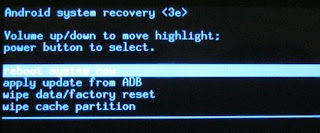
      • Now on your screen secret android menu will pop up


      • Use volume up/down key to move through options
      • use wipe data/factory reset
      • click main menu button


      • Now select Yes -- delete all users data
      • That's it, we are done.
      • Wait until it restarts follow instructions to set your phone

YOU HAVE UNLOCKED YOUR PHONE......ENJOY