FIX: Cannot type in Windows 10 Search bar. (Solved)
Many Windows 10 users, especially after a Windows update, cannot type in the File Explorer's search bar or in Cortana's search bar on the taskbar, because they cannot click on the search box to start typing.
In this post, you will find several methods to resolve the "Cannot type-search in Search Bar" issue in Windows 10.
Method 1: Run CTF Loader (ctfmon.exe)
The CTF Loader (ctfmon.exe), is a legitimate Windows process (ctfmon.exe), which controls the User Input and the Language bar. In some cases, the 'ctfmon.exe' process may not function properly and must be started again. To restart, the CTF Loader (ctfmon.exe) process:
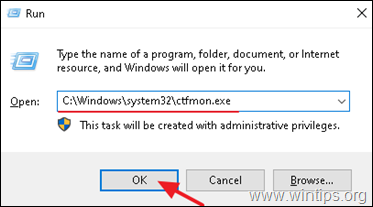
1. Simultaneously press the Windows  + R keys to open run command box.
2. In run command box, copy paste the below command and press Enter:
C:\Windows\system32\ctfmon.exe
Method 2. Re-register Modern Apps.
1. Simultaneously press the Windows + R keys to open run command box.
2. Type powershell and then press CTRL + SHIFT + ENTER
3. Inside the Administrator PowerShell window, (copy &) paste the the following command & press Enter:
Get-AppXPackage | Foreach {Add-AppxPackage -DisableDevelopmentMode -Register "$($_.InstallLocation)\AppXManifest.xml"}

4. When the deployment operation process is completed, ignore any errors and close the PowerShell window.
5. Reboot your computer and then try to perform a search.
Let me know if this guide has helped you by leaving your comment about your experience. Please like and share this guide to help others.


