Showing posts with label htc. Show all posts

Wednesday, 13 November 2013

Unlocking / Reseting Android Moblies Phone


Forget Pattern Lock : 
Method

  • It will reset all your phones data and all security option
    •  Deletes all contacts
    • Resets patter lock
    • Removes all apps that are downloaded using internet
    • Deletes all photos in phone
    • Deletes all messages


Steps

      • Shut down your Android phone
      • Remove Battery , SIM and MMC
      • Now insert Battery
      • 1st press and hold VOLUME UP key 
      • 2nd press and hold MAIN MENU key (Don't leave volume key)
      • 3rd press and hold POWER ON key (Don't leave volume and main menu key)
      • Hold up until your phones logo is not displayed on screen
      • Leave as soon as logo appears
      • Now on your screen secret android menu will pop up
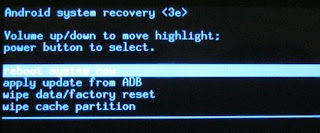
 

      • Use volume up/down key to move through options
      • use wipe data/factory reset
      • click main menu button


      • Now select Yes -- delete all users data
      • That's it, we are done.
      • Wait until it restarts follow instructions to set your phone

YOU HAVE UNLOCKED YOUR PHONE......ENJOY

Tuesday, 1 October 2013

Bypass pattern lock on android

How to bypass pattern lock on android


Pattern lock can be easily byapssed on android using your email but what if
you forgot your email password too
here is a cool trick to unlock the pattern ..

Method 1

* Connect your device with the computer via USB cable

* Open Command Prompt and key in the exact code as displayed below:

adb shell
cd /data/data/
com.android.providers.settings/
databases
sqlite3 settings.db
update system set value=0 where
name='lock_pattern_autolock';
update system set value=0 where
name='lockscreen.lockedoutpermanently';
.quit

* Reboot your device

* You may now unlock your device providing whatever pattern you like ...

Method 2

If the above method doesn't work,
try using the following code instead:

adb shell rm /data/system/
gesture.key
Bypass-Android-Pattern-Unlock2-PC
After rebooting, unlock your device
using ay preferred pattern. As
evident from the above, neither
method disables the pattern unlock.
Instead, they just nullify the pattern
order on the lock screen

Both methods have successfully been tested using a combination of HTC Desire Z (running CyanogenMod 7.2) and Windows 7 (64-bit Edition), and a good thing about these solutions is that they work independent of, as well as in tandem with, each other, so no harm in deploying them both simultaneously.

Once you regain access in to the OS, head over to the system security settings, reselect your preferred unlock method, and you're good to go.