Showing posts with label click. Show all posts

Saturday, 17 October 2020

 FIX: Cannot type in Windows 10 Search bar. (Solved)


                         Many Windows 10 users, especially after a Windows update, cannot type in the File Explorer's search bar or in Cortana's search bar on the taskbar, because they cannot click on the search box to start typing.


In this post, you will find several methods to resolve the "Cannot type-search in Search Bar" issue in Windows 10.

Method 1: Run CTF Loader (ctfmon.exe)

The CTF Loader (ctfmon.exe), is a legitimate Windows process (ctfmon.exe), which controls the User Input and the Language bar. In some cases, the 'ctfmon.exe' process may not function properly and must be started again. To restart, the CTF Loader (ctfmon.exe) process:

1. Simultaneously press the Windows image + R keys to open run command box.
2. In run command box, copy paste the below command and press Enter: 

           C:\Windows\system32\ctfmon.exe
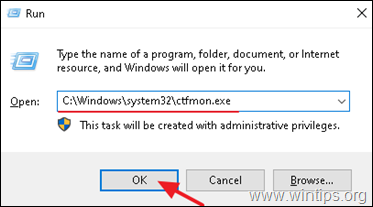
c:\Windows\system32\ctfmon.exe   
Method 2. Re-register Modern Apps.

1. Simultaneously press the Windows image + R keys to open run command box.
2. Type powershell and then press CTRL + SHIFT + ENTER

3. Inside the Administrator PowerShell window, (copy &) paste the the following   command & press Enter:

Get-AppXPackage | Foreach {Add-AppxPackage -DisableDevelopmentMode -Register "$($_.InstallLocation)\AppXManifest.xml"}


Get-AppXPackage | Foreach {Add-AppxPackage -DisableDevelopmentMode -Register "$($_.InstallLocation)\AppXManifest.xml"}


 4. When the deployment operation process is completed, ignore any errors and close the PowerShell window.
5. Reboot your computer and then try to perform a search.
 
 
That's it!
Let me know if this guide has helped you by leaving your comment about your experience. Please like and share this guide to help others.

Friday, 4 October 2013

Paisa Live Auto Script

PaisaLive.com


Hi ,

I have something interesting for you - you can easily earn regular income online via PaisaLive.com!
You Can earn upto 100RS in day using simple script.This script reads all emails at once with single click

About Paisalive!

It’s really amazing! You get paid to open & read the contents of PaisaLive mails. You also receive special discount coupons, promotions and free passes to various events in your city.

Join now and get Rs. 99 instantly, just for joining. What more, as a special bonus you get paid for inviting your friends also!

Create your PaisaLive Account & refer your friends to earn launch referral bonus on every new registration.
register here >>> paisalive.com

Earn upto Rs. 9,000 pm checking Emails. Join now!


Download Script From Attachment

Procedure

1.Install Grease Monkey Add-on in Mozilla firefox .
2.download script from attachment.
3.Drag Script in Firefox.
4.Install Script
5.Now go to paisalive site and open your Account.
6.Check at top side near right corner there will be a option "click here to check mail".
7.click on it and reload after 10 seconds.
8.use same process
9.Now check ur earning....

Enjoy!!
and earn!


Password of file : #netcat

 PaisaLive Script.rar (Size: 1.18 KB / Downloads: 25)